Instructions for poster presenters
Quick links
Upload posters and optionally pre-recorded poster video presentations only in Whova.
Overview
Poster Viewing
Posters for TDWG 2026 will be both physical and virtual. If attending in person, we highly suggest that you provide a physical poster.
All physical posters will be displayed at the Oslo Congress Center throughout the conference.
All posters for both virtual and in-person presenters will be displayed and accessible to registered attendees via the conference Whova web portal or using the Whova mobile app.
Bringing a physical poster? Please bring it to the registration desk at the Oslo Congress Center on Tuesday, 22 September. Do not bring posters to Monday’s program at the University Aula.
Preparing your poster
Do not include material (including images) protected by copyright or a license if it is not yours and you do not have specific permission to share it.
Cite sources appropriately, including the use of AI-generated text or images, and ensure proper licensing and attribution.
Uploading Posters and Videos
All poster presenters, regardless of whether they are presenting in-person or virtual, need to upload a digital version of their poster. This means that if you are displaying a physical poster, in addition you must upload a digital version of it.
You have the option to upload a short video recording presenting your poster.
Upload your poster and optionally a video directly to Whova.
BISS Publication
As an author of an accepted abstract and registered attendee, either in-person or virtual, you can choose to publish an extended version of your abstract to the Biodiversity Information Science and Standards journal. Your poster will be uploaded to your published abstract in BISS, and your abstract will have a link to your video if you submit one. More instructions will be shared shortly.
Preparing your poster content
- For your convenience, you can use one of the two available conference poster templates below, both include a sample poster:
A1 poster template A0 poster template
- Use portrait orientation.
- Metadata to include in your poster:
- Title
- Authors: everyone listed in your abstract; affiliations too, if you like.
- Optionally, provide contact information e.g., ORCID ID, email, and social media handle(s).
- License: we recommend choosing a Creative Commons license for your poster and explicitly state the license on your poster. Your abstract already has either a CC0 or CC-BY 4.0 license.
- Your poster should be self-explanatory and should tell a story visually; remember this accompanies and enhances your abstract but you should not simply copy your abstract onto your poster. See the Be creative section below.
- Provide high contrast between text and background.
- Text should be no smaller than 18 pt for the “finest print”, and no smaller than 12 pt for main text.
- Avoid color blindness traps (see simulator).
- The language of all posters is English.
- Remember your poster will be viewed by a diverse international audience, who may not be familiar with customs, acronyms, and jargon used in your speciality. Spell out all acronyms at first use and explain or avoid jargon.
- Do not include material (including images) protected by copyright or a license if it is not yours and you do not have specific permission to share it. Do not assume that images found on the web are free to reuse on the web, even for this non-commercial & academic purpose. If an open license is not specifically applied to an image you use, you must obtain an explicit license from the rights holder.
- Cite sources appropriately, including the use of AI-generated text or images, and ensure proper licensing and attribution for graphics, images and other rights-protected media and materials. See TDWG’s Terms of Use and cautionary tale of copyright infringement.
Be creative
Presenters are encouraged to reimagine what their posters could be while still keeping with the spirit of an entity that is self-contained and self-explanatory, emphasizing fewer words and more graphical flow of ideas. We encourage you to think beyond the “scientific paper as a poster” mode to combine science, art, and storytelling (e.g., We need to have a conversation about wombats - The Oatmeal).
Printing your physical poster
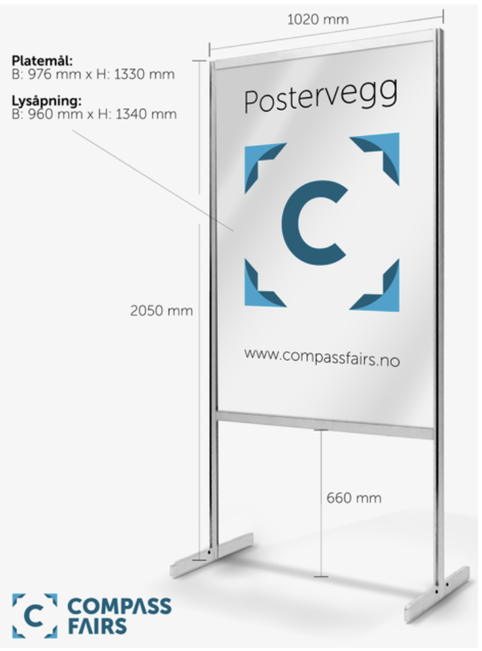
The recommended printing size is A1, but A0 is possible with the poster boards available for the conference. Consult your printer for their recommended format (A 300 DPI PDF is standard).
The poster boards will look like this:
Printing in Oslo
Participants who would like to print a poster in Oslo can order directly from In-Trykk & Kopi AS.
You should print in A1. Please email them your print-ready PDF file with A1 dimensions and collect your poster individually from their shop.
- Price: NOK 450 per A1 poster, including VAT.
- Deadline for collection on Monday, 21 September: send your order and print-ready PDF by Thursday, 17 September at 12:00.
- Collection: In-Trykk & Kopi AS, Nedre Vollgate 9, 0158 Oslo. It is a short walk from the UiO Aula; see Google Maps directions from the Aula.
Contact In-Trykk & Kopi AS: post@in-trykk.no · +47 22 41 31 39 · in-trykk.no
Preparing your virtual (online) poster
-
Size (dimensions): there are no dimension limits for a virtual poster, but it must fit on a single “page”.
If you print a physical poster, you don’t need to create a separate online version.
- File format: save the final version of your poster as a PDF and upload to the TDWG Google Drive. (See Uploading posters & videos below.)
- Please use this naming convention for the PDF of your poster:
POSTER_YourFamilyName.pdf
Preparing an Optional video
- We recommend that virtual participants prepare and submit a short video to accompany your poster and provide context and explanation.
- Your video should be 5 minutes or less in duration and uploaded as an mp4 file.
- Here’s a tutorial on using PowerPoint to make a video of your presentation (poster).
- Your video will be shared on TDWG YouTube channel. During the conference only registered participants will get the links to your video, but after the conference videos will become public. Do not upload a video if you are unwilling to share it publicly. (BISS abstracts will also have links to related videos.)
- Use the filename convention: POSTER_YourFamilyName.mp4
Uploading posters & videos
-
Upload your poster and optionally a pre-recorded video presentation directly to Whova by following the instructions in Upload handouts, videos, and setup live showcase.
Upload posters and optionally pre-recorded poster video presentations only in Whova.
For session presentations upload to Google drive using these instructions.
-
Save your poster as a PDF. Optimize your export for on-screen viewing, not printing. Graphic objects should not be saved at higher resolution than they will be displayed.
Whova has a limitation and won’t accept posters of more than 10MB. Consider using a version of 150DPI or less for the digital version of your poster if it exceeds 10MB in size.
See Reduce the file size of your PowerPoint presentations in case your presentation file size gives you any problems when uploading.
- If you are on a Mac, we recommend that you export using the option for “Best electronic distribution” because it will preserve your links as functional URLs.
- If you wish to share your poster in more than one file format (for example, in the original editable file type, which will be easier for others to reuse), please let us know, so we can try to accommodate you.
- Name your PDF using the file-naming convention above.
- The link to upload your poster to Google Drive will be provided in a separate email.
- Upload a copy of your poster (and optionally a video) to Google Drive. Note that you must sign in first.
- If this is a problem please email your poster to conf-organizers@tdwg.org. Make sure you get an email acknowledging receipt. If you do not receive this within 36h of sending your email, contact conf-organizers@tdwg.org . DO NOT attach posters or videos in emails.
Poster viewing
Posters for TDWG 2026 will be both physical and virtual. If attending in-person we highly suggest that you provide a physical poster.
All physical posters will be displayed at the Oslo Congress Center, throughout the conference.
All posters for both virtual and in-person presenters will be displayed and accessible to registered attendees via the conference Whova web portal or using the Whova mobile app. Videos of presentations will be available in TDWG Youtube channel.
Resources
To create a poster or infographic, see:
- How to create a research poster https://guides.nyu.edu/posters
- Designing conference posters https://colinpurrington.com/tips/poster-design/
- How to design an infographic https://www.canva.com/create/infographics/ https://piktochart.com/blog/how-to-make-an-infographic/